For departments and organizations
Many minds.
One workspace.
In My Mind is built for teams from day one. Shared workspaces. Roles and seats. Per-zone access. Workflows and playbooks for the work you do again and again. Voice and chat, same memory, same controls. Your whole organization on one map.
// workspace structure
A digital office that maps to your org chart.
01 · WORKSPACES
Personal + company
Every user has a personal workspace. Add company workspaces for each org you're part of. Switch with the workspace chip. Per-workspace billing, members, settings.
02 · LEVELS
Floors in your building
Each workspace can have multiple levels. Public-facing on L1. Internal on L2. Confidential on L3. Different members see different floors. Per-level expansion packs.
03 · ZONES
Departments on a floor
Each zone is a topic, project, or function. Drop docs in. Set a persona. Pick a team. Per-zone permissions. Neighbors share context.
04 · CONVERSATIONS
Work that happens in a zone
Single-AI chats, full council deliberations, workflow runs. Linked across conversations. Multi-user real-time presence, see who else is in the zone.
// governance
Five layers of access. All audited.
Access control isn't a feature bolted on. It's the architecture. Five independent gates from user identity down to individual conversation.
USER
Identity
SSO · MFA · workspace roles · revocable sessions
WORKSPACE
Isolation
Personal vs company hard-isolated
LEVEL
Classification
Per-member READ/WRITE/ADMIN per floor
ZONE
Topic ACL
Per-user permissions per zone
CONVERSATION
Thread guard
Cross-conversation reference validation
All audit-logged. Sanitized through one prompt-injection defense pipeline. Security deep dive →
// repeatable work
For the work you do again and again.
Build a multi-step procedure once. Add approvals and decision points where they belong. Run it on a schedule, after a phone call, or on command. No code required.
Pull customer signals
CRM + Slack + email
✓Theme analysis
council · 3 specialists
✓Material change?
if yes → escalate
◇VP review
Slack: @vp-product
Brief to all-hands
Slack + email digest
SCHEDULE
Mondays 7:00 CT
TRIGGERS
cron · webhook · voice
APPROVALS
spoken or click
AUDIT
every step recorded
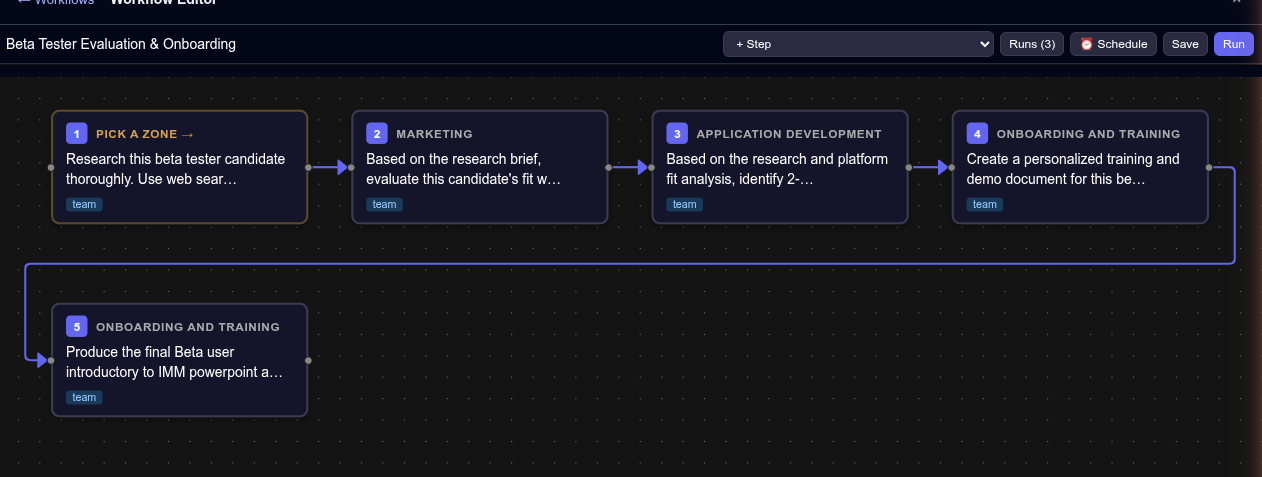
WORKFLOW EDITOR · DRAG, CONNECT, SCHEDULE, RUN
Your team in Microsoft 365.
The In My Mind Office add-in puts your team inside Word, Excel, and Outlook. Insert AI-drafted content into the document you're editing. Run a council against the email thread you're reading. Push a sheet of numbers through a research zone without copy-paste.
- → Task pane in Word / Excel / Outlook (tree-pick zone, stream chat, insert into document)
- → M365 Copilot agent, invoke your team from anywhere Copilot runs
- → Same auth, same memory, same workflows as the web
- → Per-conversation model switch. Team mode or solo. Insert-to-doc on demand.
In beta. Available now for closed-beta workspaces. Request access from your Sales contact or workspace admin.

// out of the box
Connect what you already use.
Plus your own systems via MCP, OpenAPI, Webhook. All integrations →
// skills
Your company's how-tos. In one binder. Shared by every team.
Skills are a shared library of repeatable processes, "how we draft a postmortem", "how we qualify a lead", "how Support confirms an account before any change". Workspace admins curate the shared library; managers turn specific skills on per team (zone). Build in plain language, or import in the open Agent Skills (SKILL.md) format. See how Skills work →
// in the wild
Teams that connect once, work everywhere.
FOR SECURE INDUSTRIES
On-premises deployment available.
For organizations with regulated data, life sciences, financial services, defense, government, healthcare, we deploy In My Mind into your VPC or on-prem infrastructure. Same architecture. Same UX. Your perimeter. Contact your In My Mind Sales team for details.
Where Humans and AI collaborate.