A spatial UI for AI workspaces
The spatial UI built for AI workspaces.
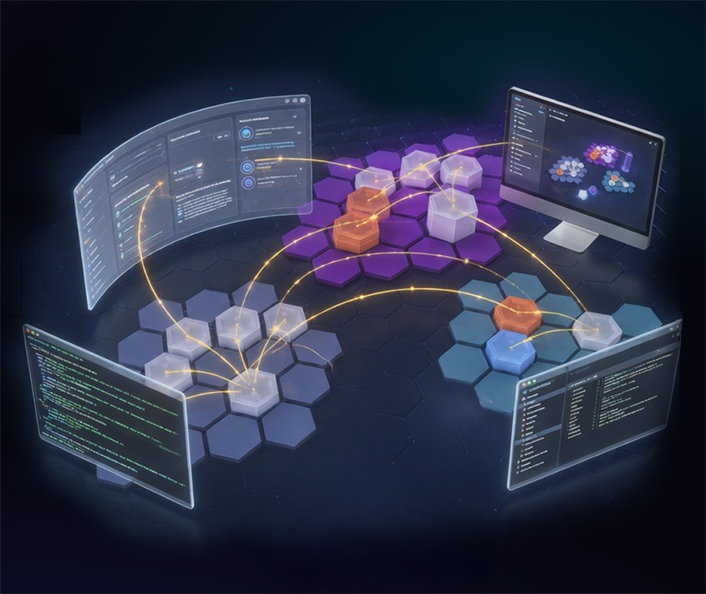
A spatial UI for an AI workspace gives work a place: zones on a map, each with its own team of AI specialists, its own memory, and its own playbook. In My Mind is the first general-purpose implementation. Teams run marketing in one zone, research in another, finance in a third, with the context, the models, and the conversation history staying where they belong.
// What a spatial UI for AI is
Work gets a place, not a chat log.
A chat UI is one dimension: a transcript scrolling down. Everything the model knows about you is squeezed through that one window. When the context fills, it resets. When you want to run two projects, you open two tabs and lose the thread between them.
A spatial UI for an AI workspace does the opposite. Your work has a map. Each region of the map is a zone, and a zone is a room: a persistent set of conversations, documents, memory, and AI specialists that stay together. You move between zones the way a team moves between departments. The AI inside a zone remembers that zone's work and nothing else.
That shift, from transcript to space, is the one UI change that lets a human team actually run multiple AI agents in parallel without the state collapsing in on itself.
// Why chat alone can't carry this
Chat UI vs. spatial UI, side by side.
The chat window was the right UI for one person talking to one model. It is the wrong UI for a team orchestrating many.
A single chat UI
One window. One memory. One model.
- Every project competes for the same context window.
- Switching tasks means losing or confusing state.
- One model answers everything, well or badly.
- Shared knowledge lives in your head, not the interface.
- A second person on the same chat is a scheduling problem.
- When the window fills, the conversation starts over.
A spatial UI for AI
Many zones. Many memories. Many models.
- Each zone has its own documents, history, and playbook.
- Switching zones is switching rooms, not resetting state.
- The right model per role, picked per zone.
- Shared knowledge is a durable artifact anyone can read.
- Teammates work in parallel zones without stepping on each other.
- Memory compounds across runs instead of starting over.
// How In My Mind implements it
Five principles behind the hex map.
A spatial UI only works if its primitives are durable. In My Mind commits to five, and every other feature rests on them.
01 · Zones
Work has a location.
Every zone is a persistent room: its own conversations, its own documents, its own access policies. You enter a zone to work; you leave it the way you leave an office.
02 · Memory
Context lives in the zone.
Documents, prior runs, and playbooks belong to the zone, not the model. Swap the model tomorrow and the memory stays. The AI that joins the zone inherits what the zone already knows.
03 · Teams
AI specialists per role.
A zone is staffed with specialists: an Architect, a Research Lead, a Copy Editor, a QA Engineer. Each uses the model best suited to its job. The Lead delegates. Nothing is a single model monoculture.
04 · Map
Zones compose into levels.
Levels group related zones (Marketing, Engineering, Finance) and inherit shared policies, members, and shared memory. The whole workspace is one navigable, hierarchical map.
05 · Governance
One policy covers users and AI.
Every zone has access levels (DISCOVER, READ, WRITE, ADMIN) that apply to both humans and the AI agents they summon. An agent inherits the user's access, never exceeds it. See centralized governance for AI agents and users.
// Spatial + governed
A spatial UI only works if the governance layer comes with it.
Giving work a place is only half the shift. The other half is that the place itself enforces the policy. Each zone on the hex map carries its own access levels, its own workspace roles, its own connections, and its own audit. The same rules apply whether a human or an agent is inside. That is what makes centralized governance for AI agents and users actually land, instead of showing up as a dashboard nobody reads.
// Who it's for
Teams that outgrew the single chat window.
A spatial UI matters when the number of parallel things in flight exceeds what any one person, or any one chat window, can hold. That's a growing team with recurring projects, a researcher running many parallel investigations, an operator with workflows that touch multiple domains, or an enterprise that needs each department's AI work to stay inside the department's own policy.
Founders & Builders
Operate end to end without rebuilding context every day.
Explore →
Researchers
Parallel investigations with grounded memory and persistent documents.
Explore →
Teams
Multi-workspace, roles, per-zone access, shared playbooks.
Explore →
Enterprise
SOC-ready, SSO, on-prem option, compliance baked in.
Explore →
// Start a workspace
See the spatial UI in your browser.
Your workspace is ready in minutes. The home zone is yours. Add more as the work grows.